The Reporting API uses standard HTTP status codes and returns structured error responses. Understanding error patterns and implementing proper retry logic is essential for building resilient applications.
If you're just getting started and hitting errors, here are the most frequent issues and quick fixes:
403 Forbidden — Your access token is invalid or missing.
- Verify your token is correct and hasn't expired
- Check the header format:
Authorization: Bearer YOUR_TOKEN - Ensure you're using a personal access token or an OAuth token with
REPORTING_READscope
400 Bad Request — "Cube not found" — The cube or view name in your query doesn't exist.
- Fetch available names via
GET /v1/meta - Names are case-sensitive — use them exactly as shown in metadata
- Views (like
Sales) are often easier to start with than cubes
Empty results ("data": []) — Your query succeeded but matched no data.
- Verify your date range includes actual transaction data
- Try a broader date range to confirm data exists
- Make sure you're using the right view/cube for your use case
"Continue wait" never resolves — Your query is too complex or the date range is too large.
- Reduce the date range
- Remove unnecessary dimensions
- Simplify to fewer measures
- See Continue wait pattern below for proper retry logic
For detailed explanations, see the specific sections below.
| Status Code | Meaning | Common Causes |
|---|---|---|
| 200 | Success | Query executed successfully or "Continue wait" |
| 400 | Bad Request | Invalid query structure, unknown measures/dimensions |
| 401 | Unauthorized | Missing authentication token |
| 403 | Forbidden | Invalid or expired token, insufficient permissions |
| 404 | Not Found | Invalid endpoint path |
| 429 | Too Many Requests | Rate limit exceeded |
| 500 | Internal Server Error | Server-side error, database timeout |
| 503 | Service Unavailable | Service temporarily unavailable |
All errors return a JSON object with an error field:
{
  "error": "Error message"
}
{
  "error": "Measure 'Orders.invalid_measure' not found"
}
{
  "error": "Unauthorized"
}
{
  "error": "Query execution timeout"
}
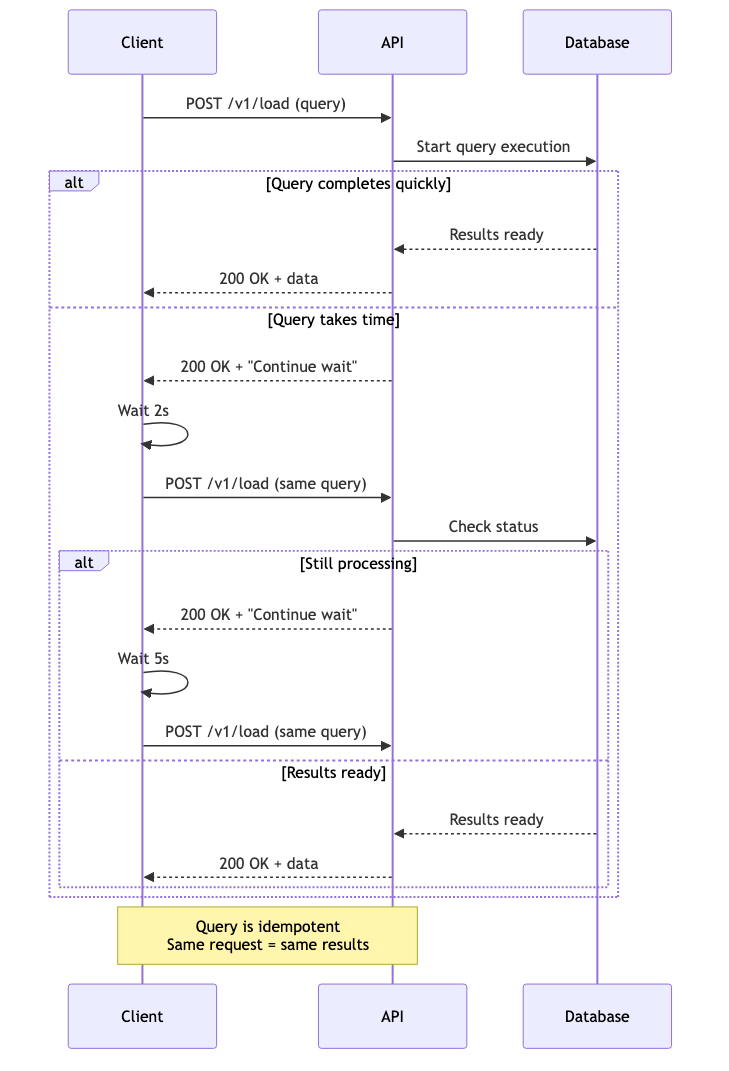
The most common "error" you'll encounter isn't actually an error—it's the Continue wait response.
When a query takes time to process, the API returns:
{
  "error": "Continue wait"
}
HTTP Status: 200 (Success)
This is not an error. It means:
- Your query is valid
- Processing is underway
- You should retry the same request
Complex queries may need to:
- Scan large amounts of data
- Perform multiple aggregations
- Wait for pre-aggregation builds
Rather than holding the connection open, the API returns quickly and asks you to poll.
import time
import requests

def execute_with_retry(query, max_attempts=10, delay_seconds=2):
    """Execute query with automatic Continue wait retry."""

    url = "https://connect.squareup.com/reporting/v1/load"
    headers = {
        "Authorization": f"Bearer {SQUARE_ACCESS_TOKEN}",
        "Content-Type": "application/json"
    }

    for attempt in range(1, max_attempts + 1):
        response = requests.post(url, headers=headers, json=query)

        # Check for HTTP errors
        if response.status_code != 200:
            raise Exception(f"HTTP {response.status_code}: {response.text}")

        data = response.json()

        # Check for Continue wait
        if data.get("error") == "Continue wait":
            print(f"Attempt {attempt}/{max_attempts}: Query processing...")
            time.sleep(delay_seconds)
            continue

        # Success!
        return data

    raise TimeoutError(f"Query did not complete after {max_attempts} attempts")

# Usage
try:
    results = execute_with_retry(my_query)
    print(f"Received {len(results['data'])} rows")
except TimeoutError as e:
    print(f"Query timed out: {e}")
except Exception as e:
    print(f"Query failed: {e}")
async function executeWithRetry(query, maxAttempts = 10, delayMs = 2000) {
  const url = "https://connect.squareup.com/reporting/v1/load";
  const headers = {
    "Authorization": `Bearer ${SQUARE_ACCESS_TOKEN}`,
    "Content-Type": "application/json"
  };

  for (let attempt = 1; attempt <= maxAttempts; attempt++) {
    const response = await fetch(url, {
      method: "POST",
      headers: headers,
      body: JSON.stringify(query)
    });

    if (!response.ok) {
      throw new Error(`HTTP ${response.status}: ${await response.text()}`);
    }

    const data = await response.json();

    if (data.error === "Continue wait") {
      console.log(`Attempt ${attempt}/${maxAttempts}: Query processing...`);
      await new Promise(resolve => setTimeout(resolve, delayMs));
      continue;
    }

    // Success!
    return data;
  }

  throw new Error(`Query did not complete after ${maxAttempts} attempts`);
}

// Usage
try {
  const results = await executeWithRetry(myQuery);
  console.log(`Received ${results.data.length} rows`);
} catch (error) {
  console.error(`Query failed: ${error.message}`);
}
- Use exponential backoff: Start with 2s, increase to 5s, then 10s
- Set reasonable max attempts: 10-20 attempts is typical
- Log retry attempts: Help with debugging
- Don't retry forever: Fail gracefully after max attempts
- Keep the same query: Don't modify the query between retries
def execute_with_exponential_backoff(query, max_attempts=10):
    """Execute with exponential backoff."""

    delays = [2, 2, 5, 5, 10, 10, 15, 15, 20, 20]  # seconds

    for attempt in range(max_attempts):
        response = requests.post(url, headers=headers, json=query)

        if response.status_code != 200:
            raise Exception(f"HTTP {response.status_code}: {response.text}")

        data = response.json()

        if data.get("error") == "Continue wait":
            delay = delays[attempt] if attempt < len(delays) else 20
            print(f"Attempt {attempt + 1}: Waiting {delay}s...")
            time.sleep(delay)
            continue

        return data

    raise TimeoutError("Query timed out")
Validation errors occur when your query references invalid entities or has structural issues.
Error:
{
  "error": "Measure 'Orders.unknown_measure' not found"
}
Cause: The measure doesn't exist in the current schema.
Solution:
- Fetch fresh metadata:
GET /v1/meta - Verify the measure name (case-sensitive)
- Check if the measure was deprecated
Prevention:
def validate_measures(query, metadata):
    """Validate measures before querying."""
    valid_measures = set()
    for cube in metadata['cubes']:
        valid_measures.update(m['name'] for m in cube['measures'])

    for measure in query.get('measures', []):
        if measure not in valid_measures:
            raise ValueError(f"Invalid measure: {measure}")
Error:
{
  "error": "Dimension 'Orders.unknown_dimension' not found"
}
Solution: Same as unknown measure—validate against metadata.
Error:
{
  "error": "Segment 'Orders.unknown_segment' not found"
}
Solution: Check available segments in metadata.
Error:
{
  "error": "Invalid date range format"
}
Cause: Date format is incorrect.
Solution: Use YYYY-MM-DD format:
{
  "dateRange": ["2024-01-01", "2024-01-31"]
}
Error:
{
  "error": "Time dimension must include 'dimension' and 'dateRange'"
}
Solution: Ensure time dimensions are complete:
{
  "timeDimensions": [{
    "dimension": "Orders.sale_timestamp",
    "dateRange": ["2024-01-01", "2024-01-31"]
  }]
}
Error:
{
  "error": "Unauthorized"
}
Causes:
- Missing
Authorizationheader - Malformed header (not
Bearer TOKEN) - Empty token
Solution:
# Correct format
Authorization: Bearer YOUR_ACCESS_TOKEN

# Wrong formats
Authorization: YOUR_ACCESS_TOKEN  # Missing "Bearer"
Authorization: Bearer   # Missing token
Error:
{
  "error": "Forbidden"
}
Causes:
- Invalid access token
- Expired token
- Token lacks required permissions
- Using OAuth token without REPORTING_READ scope
Solution:
- Verify token in Developer Console
- Generate a new personal access token
- Check token hasn't expired
- Ensure you're using a personal access token (not OAuth)
Error:
{
  "error": "Rate limit exceeded"
}
Solution: Implement exponential backoff with Retry-After header:
def execute_with_rate_limit_retry(query, max_retries=3):
    """Execute with rate limit retry."""

    for attempt in range(max_retries):
        response = requests.post(url, headers=headers, json=query)

        if response.status_code == 429:
            retry_after = int(response.headers.get('Retry-After', 60))
            print(f"Rate limited. Retrying after {retry_after}s...")
            time.sleep(retry_after)
            continue

        if response.status_code != 200:
            raise Exception(f"HTTP {response.status_code}")

        return response.json()

    raise Exception("Rate limit exceeded after retries")
- Cache results: Don't re-query for the same data
- Batch queries: Combine multiple measures in one query
- Use appropriate cache strategies: Leverage server-side caching
- Respect Retry-After: Don't retry immediately
- Monitor usage: Track query volume
Error:
{
  "error": "Internal server error"
}
Causes:
- Database timeout
- Server-side bug
- Resource exhaustion
Solution:
- Retry with exponential backoff (may be transient)
- Simplify the query (reduce date range, dimensions)
- Contact support if persistent
def execute_with_server_error_retry(query, max_retries=3):
    """Retry on server errors with backoff."""

    for attempt in range(max_retries):
        try:
            response = requests.post(url, headers=headers, json=query)

            if response.status_code == 500:
                delay = 2 ** attempt  # Exponential: 1s, 2s, 4s
                print(f"Server error. Retrying in {delay}s...")
                time.sleep(delay)
                continue

            return response.json()

        except requests.exceptions.RequestException as e:
            if attempt == max_retries - 1:
                raise
            time.sleep(2 ** attempt)

    raise Exception("Server error after retries")
Error:
{
  "error": "Service temporarily unavailable"
}
Cause: Service is down for maintenance or experiencing issues.
Solution:
- Retry with exponential backoff
- Check Square status page
- Implement circuit breaker pattern
Error:
{
  "error": "Query execution timeout"
}
Causes:
- Query is too complex
- Date range is too large
- Too many dimensions
- No pre-aggregations available
Solutions:
// Instead of
{"dateRange": ["2020-01-01", "2024-12-31"]}

// Try
{"dateRange": ["2024-01-01", "2024-01-31"]}
// Instead of
{"dimensions": ["Orders.location_id", "Orders.customer_id", "Orders.device_id"]}

// Try
{"dimensions": ["Orders.location_id"]}
// Instead of
{"granularity": "day"}

// Try
{"granularity": "month"}
{
  "filters": [{
    "member": "Orders.location_id",
    "operator": "equals",
    "values": ["L1234567890ABC"]
  }]
}
Response:
{
  "data": []
}
This is not an error, but you should handle it:
results = execute_query(query)

if not results.get('data'):
    print("No data found for the specified criteria")
    # Handle empty case
else:
    print(f"Found {len(results['data'])} rows")
Common causes:
- Date range has no transactions
- Filters are too restrictive
- Segment excludes all data
- Wrong cube for your use case
Error:
{
  "error": "Measure 'Orders.legacy_measure' is deprecated. Use 'Orders.new_measure' instead."
}
Solution:
- Update your query to use the new measure
- Invalidate your metadata cache
- Re-fetch metadata to discover new measures
def handle_deprecated_measure(query, metadata):
    """Replace deprecated measures with current ones."""

    # Map of deprecated -> current measures
    replacements = {
        'Orders.legacy_tax': 'Orders.sales_tax_amount',
        'Orders.old_sales': 'Orders.net_sales'
    }

    updated_measures = []
    for measure in query.get('measures', []):
        if measure in replacements:
            print(f"Replacing deprecated {measure} with {replacements[measure]}")
            updated_measures.append(replacements[measure])
        else:
            updated_measures.append(measure)

    query['measures'] = updated_measures
    return query
Here's a production-ready error handling implementation:
import time
import requests
from typing import Dict, Any, Optional

class ReportingAPIClient:
    def __init__(self, access_token: str):
        self.base_url = "https://connect.squareup.com/reporting"
        self.headers = {
            "Authorization": f"Bearer {access_token}",
            "Content-Type": "application/json"
        }

    def execute_query(
        self,
        query: Dict[str, Any],
        max_attempts: int = 10,
        max_retries: int = 3
    ) -> Dict[str, Any]:
        """
        Execute a query with comprehensive error handling.

        Args:
            query: The query object
            max_attempts: Max attempts for Continue wait
            max_retries: Max retries for server errors

        Returns:
            Query results

        Raises:
            ValueError: Invalid query
            TimeoutError: Query timed out
            Exception: Other errors
        """

        # Validate query first
        self._validate_query(query)

        # Execute with retries
        for retry in range(max_retries):
            try:
                return self._execute_with_continue_wait(query, max_attempts)

            except requests.exceptions.HTTPError as e:
                status_code = e.response.status_code

                if status_code == 400:
                    # Validation error - don't retry
                    raise ValueError(f"Invalid query: {e.response.text}")

                elif status_code == 401 or status_code == 403:
                    # Auth error - don't retry
                    raise Exception(f"Authentication failed: {e.response.text}")

                elif status_code == 429:
                    # Rate limit - respect Retry-After
                    retry_after = int(e.response.headers.get('Retry-After', 60))
                    print(f"Rate limited. Waiting {retry_after}s...")
                    time.sleep(retry_after)
                    continue

                elif status_code >= 500:
                    # Server error - retry with backoff
                    if retry < max_retries - 1:
                        delay = 2 ** retry
                        print(f"Server error. Retrying in {delay}s...")
                        time.sleep(delay)
                        continue
                    raise

                else:
                    raise

            except requests.exceptions.RequestException as e:
                # Network error - retry with backoff
                if retry < max_retries - 1:
                    delay = 2 ** retry
                    print(f"Network error. Retrying in {delay}s...")
                    time.sleep(delay)
                    continue
                raise

        raise Exception(f"Query failed after {max_retries} retries")

    def _execute_with_continue_wait(
        self,
        query: Dict[str, Any],
        max_attempts: int
    ) -> Dict[str, Any]:
        """Execute query with Continue wait retry."""

        delays = [2, 2, 5, 5, 10, 10, 15, 15, 20, 20]

        for attempt in range(max_attempts):
            response = requests.post(
                f"{self.base_url}/v1/load",
                headers=self.headers,
                json=query
            )

            response.raise_for_status()
            data = response.json()

            if data.get("error") == "Continue wait":
                delay = delays[attempt] if attempt < len(delays) else 20
                print(f"Attempt {attempt + 1}/{max_attempts}: Waiting {delay}s...")
                time.sleep(delay)
                continue

            return data

        raise TimeoutError(f"Query did not complete after {max_attempts} attempts")

    def _validate_query(self, query: Dict[str, Any]):
        """Basic query validation."""

        if not query.get('measures') and not query.get('dimensions'):
            raise ValueError("Query must include at least one measure or dimension")

        if 'timeDimensions' in query:
            for td in query['timeDimensions']:
                if 'dimension' not in td or 'dateRange' not in td:
                    raise ValueError("Time dimension must include 'dimension' and 'dateRange'")

# Usage
client = ReportingAPIClient(access_token=SQUARE_ACCESS_TOKEN)

try:
    results = client.execute_query({
        "measures": ["Orders.net_sales"],
        "timeDimensions": [{
            "dimension": "Orders.sale_timestamp",
            "dateRange": ["2024-01-01", "2024-01-31"],
            "granularity": "day"
        }],
        "segments": ["Orders.closed_checks"]
    })

    print(f"Success! Received {len(results['data'])} rows")

except ValueError as e:
    print(f"Invalid query: {e}")
except TimeoutError as e:
    print(f"Query timed out: {e}")
except Exception as e:
    print(f"Query failed: {e}")
import logging

logger = logging.getLogger(__name__)

def execute_with_logging(query):
    """Execute query with comprehensive logging."""

    logger.info(f"Executing query: {json.dumps(query)}")
    start_time = time.time()

    try:
        results = execute_query(query)
        duration = time.time() - start_time

        logger.info(f"Query succeeded in {duration:.2f}s, {len(results['data'])} rows")
        return results

    except TimeoutError as e:
        duration = time.time() - start_time
        logger.error(f"Query timed out after {duration:.2f}s: {e}")
        raise

    except Exception as e:
        duration = time.time() - start_time
        logger.error(f"Query failed after {duration:.2f}s: {e}")
        raise
- Query success rate
- Average query duration
- Continue wait frequency
- Timeout frequency
- Rate limit hits
- Error types and frequency
When a query fails:
-
Check HTTP status code
- 401/403: Authentication issue
- 400: Invalid query
- 429: Rate limit
- 500/503: Server issue
-
Verify authentication
- Token is valid
- Header format is correct
- Using personal access token (not OAuth)
-
Validate query structure
- All measures exist in metadata
- All dimensions exist in metadata
- Date ranges are valid
- Required fields are present
-
Simplify the query
- Reduce date range
- Remove dimensions
- Increase granularity
- Add filters
-
Check for Continue wait
- Implement retry logic
- Use exponential backoff
- Set reasonable max attempts
-
Review metadata
- Refresh metadata cache
- Check for deprecated measures
- Verify cube names