Applies to: Gift Cards API | Gift Card Activities API | Orders API | Locations API | Payments API | Web Payments SDK | In-App Payments SDK
Learn how to create a Square gift card and activate it with an initial balance using the Gift Cards API and Gift Card Activities API.
Developers can use Square APIs to sell new Square gift cards for Square sellers. Gift cards can be used at any of the seller's business locations.
To sell a gift card, first process the order for the gift card amount. Then, call CreateGiftCard to create or register a gift card and call CreateGiftCardActivity to activate the gift card with the initial balance.
After the gift card is activated with a balance, it can be redeemed for purchases and reloaded with additional funds. All changes to a gift card balance or state are managed through gift card activities. These activities are initiated by sellers or buyers from a Square product, by third-party applications using the Gift Card Activities API, Payments API, or Refunds API, or by Square.
Note
Prefer to watch a video? Check out Sandbox 101: Gift Cards API to see how you can purchase, create, and activate a gift card in the Sandbox.
The first step to selling a gift card is to create an order for the amount to add to the gift card and then collect the payment from the buyer.
Orders API - If your application uses the Orders API to process orders, make sure to include a line item that sets item_type to GIFT_CARD in your CreateOrder request, as shown in the following example:
Create order
You use the order ID, line item GUID, and location ID later in your CreateGiftCardActivity request.
After the gift card order is paid, call CreateGiftCard to create a digital gift card or register a physical (plastic) gift card for a Square seller. Provide the following information in the request:
-
gift_card- Details about the gift card:-
type- SpecifyDIGITALfor a digital gift card orPHYSICALfor a physical gift card. -
ganandgan_source- Include this information depending on your use case, as shown in the following examples.
-
-
location_id- The ID of the reporting location to use when gift card sales are processed. If needed, call ListLocations to get the location ID. Gift cards can be redeemed at any of the seller's locations. -
idempotency_key- A unique ID for the request that can be optionally included to ensure idempotency.
The following request creates a digital card and directs Square to generate the gift card number (GAN). This request omits both gan and gan_source, which defaults to SQUARE.
Create gift card
For digital gift cards, Square generates a 16-digit GAN. The GAN is numeric only and starts with 778332.
The following request creates a digital gift card with a custom GAN. This request requires both gan and gan_source.
gan- Provide a GAN containing 8 to 20 alphanumeric characters. The GAN must be unique for the seller. For other requirements and limitations, see Custom GANs.gan_source- SpecifyOTHER.
Create gift card
The following request registers a physical gift card. This request requires gan and omits gan_source, which defaults to SQUARE.
gan- The GAN printed on the gift card.
Create gift card
Physical gift cards have a Square-generated 16-digit GAN. The GAN is numeric only and starts with 778273. For more information about working with physical gift cards, see Considerations.
If the CreateGiftCard request is successful, Square returns the gift card. The following example is a digital gift card with a Square-assigned GAN:
{
  "gift_card": {
    "id": "gftc:8ff6ad93265f439d8d5a4da52EXAMPLE",
    "type": "DIGITAL",
    "gan_source": "SQUARE",
    "state": "PENDING",
    "balance_money": {
      "amount": 0,
      "currency": "USD"
    },
    "gan": "7783320002000000",
    "created_at": "2023-02-25T00:26:55Z"
  }
}
After creating or registering the gift card, call CreateGiftCardActivity and provide the following information for gift_card_activity in the request:
-
gift_card_idorgift_card_gan- The gift card ID or GAN. Only one is required to create the activity. -
type- SpecifyACTIVATE. -
activate_activity_details- Details about theACTIVATEactivity. The information you provide depends on how your application processes orders: -
location_id- The location where the activity occurred.
If your application uses the Orders API to process the order, provide the following information for activate_activity_details:
order_id- The ID of the gift card order.line_item_uid- The UID of theGIFT_CARDline item. Square reads the order and determines the amount to add to the gift card balance.
Create gift card activity
If your application uses a custom order processing system, provide the following information for activate_activity_details:
amount_money- The amount to add to the gift card balance.buyer_payment_instrument_ids- Any payment instrument IDs processed for the gift card order, such as a card ID or bank account ID. Square uses this information to perform compliance checks.reference_id- An optional ID that associates the activity with an entity in your ordering or payment processing system.
Create gift card activity
If the CreateGiftCardActivity request is successful, Square returns a gift card activity similar to the following example. The activity contains information about the gift card, including the updated balance.
{
  "gift_card_activity": {
    "id": "gcact_4e2b1fb8c869400080d9478d6EXAMPLE",
    "type": "ACTIVATE",
    "location_id": "LNCXKAEXAMPLE",
    "created_at": "2023-07-26T23:31:12.000Z",
    "gift_card_id": "gftc:0cded29ae32b4e5591b2d6c8dEXAMPLE",
    "gift_card_gan": "7783320030000000",
    "gift_card_balance_money": {
      "amount": 5000,
      "currency": "USD"
    },
    "activate_activity_details": {
      "amount_money": {
        "amount": 5000,
        "currency": "USD"
      },
      "order_id": "ksrgV4JgYfPl3g6VXMs7KEXAMPLE",
      "line_item_uid": "fOHmeQJxmJp94DLEXAMPLE"
    }
  }
}
After a gift card is activated, the gift card holder can redeem the gift card for purchases and reload the gift card. Gift cards can also be linked with customer profiles and saved as gifts card on file.
Applications that create and manage orders using the Orders API can provide information from the gift card order when creating an ACTIVATE activity.
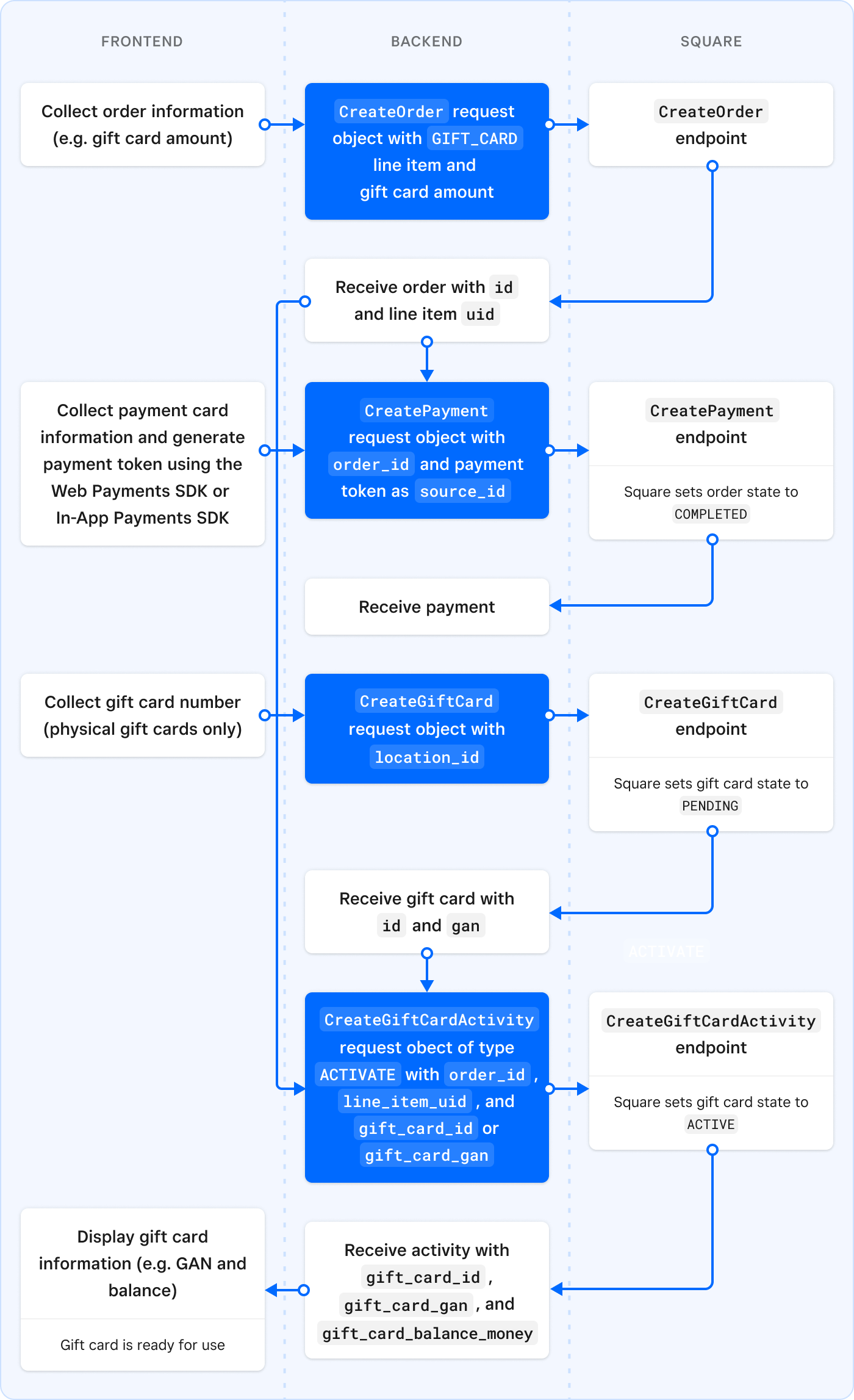
The following diagram shows the typical process of selling a gift card for applications that integrate with the Orders API and Payments API. The application uses the Orders API to create a gift card order (with a GIFT_CARD line item that specifies the gift card amount) and the Web Payments SDK and Payments API to collect payment for the gift card order. The application then calls the Gift Cards API to create a digital gift card and the Gift Card Activities API to activate the gift card with the initial balance.
When the application activates the gift card, Square reads the GIFT_CARD line item to determine the amount to add to the gift card balance.
Note
Applications that use a custom system to process orders (instead of the Orders API) provide different information in the CreateGiftCardActivity request. For more information, see Activate a gift card when using custom order processing.
Buyers can purchase gift cards for themselves or for another recipient.
When digital gift cards are created using the API, the developer is responsible for delivering the gift card information. For example, you might display the information on your application's website or send the information to the recipient.
Note that when digital gift cards are sold using Square Point of Sale or other Square products, Square emails the digital gift card to the gift card recipient. The email provides gift card information, including the redemption code (GAN) that buyers use to make purchases with the gift card, as shown in the following example:
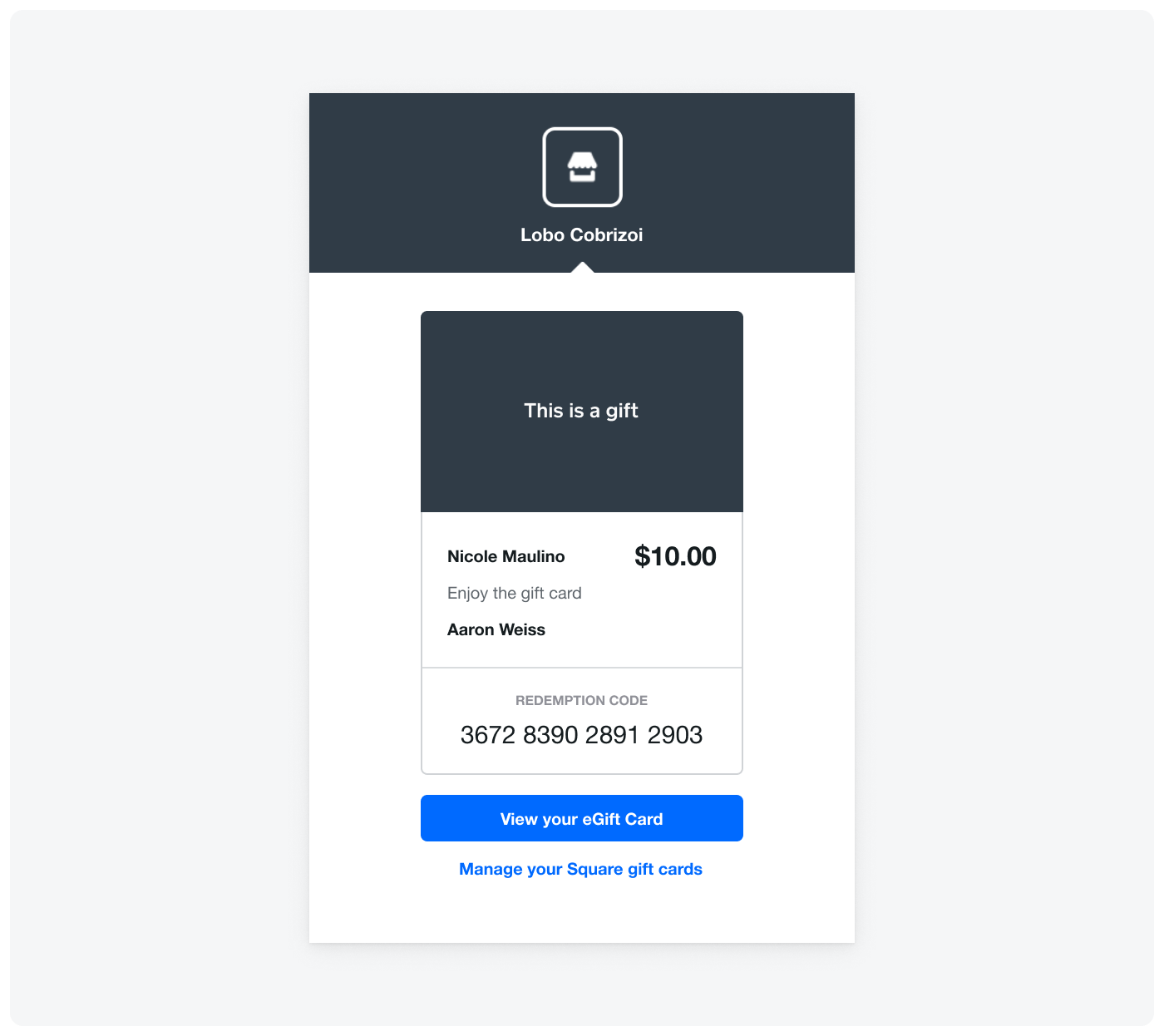
Square also notifies the seller when a gift card is sold.
You can sell or reload a gift card at a discounted price by adding an ad hoc LINE_ITEM discount to the order. With ad hoc discounts, the discount details are defined in the order.
-
Create a gift card order that uses the following fields to add the discount:
discounts- Defines the discount details:uid- An arbitrary, temporary UID used to reference the discount within the order.percentage- The percentage of the discount, which is applicable forFIXED_PERCENTAGEdiscount types only.
line_items- Includes a line item for the gift card sale:item_type- SpecifyGIFT_CARD.base_price_money- The amount to add to the gift card balance.applied_discounts- The discount for the gift card, with the discount's UID specified indiscount_uid.
The following
CreateOrderrequest defines a discount for 10% off the gift card amount:Create order
The
total_moneyfield of the returned order includes the 10% discount, as shown in the following excerpt:{ "order": { ... "line_items": [ { "total_discount_money": { "amount": 250, "currency": "USD" }, "total_money": { "amount": 2250, "currency": "USD" }, ... } ] ... } } -
Create a payment for the order. If your application uses the Payments API to process payments, you might first need to generate a payment token using the Web Payments SDK or In-App Payment SDK to provide for the required
source_id. For more information, see Take Payments.The following
CreatePaymentrequest creates a payment equal to thetotal_moneyamount of the order:Create payment
-
When selling a new gift card, create or register the gift card. Skip this step when reloading a gift card.
-
Create the activity that updates the gift balance.
- When selling a new gift card, create an
ACTIVATEactivity. - When reloading a gift card, create a
LOADactivity.
The following
CreateGiftCardActivityexample request creates anACTIVATEactivity and specifies the ID of the order and UID of theGIFT_CARDline item:Create gift card activity
Square adds the prediscounted amount to the gift card balance. In the following example response, you can see that Square added $25.00:
{ "gift_card_activity": { "id": "gcact_afe01be1e2c74ce2af06f1e19EXAMPLE", "type": "LOAD", "location_id": "LNCXKAEXAMPLE", "created_at": "2021-10-20T20:45:10.000Z", "gift_card_id": "gftc:0a785b3644b64b74878d8e86fEXAMPLE", "gift_card_gan": "7783320006000000", "gift_card_balance_money": { "amount": 7873, "currency": "USD" }, "load_activity_details": { "amount_money": { "amount": 2500, "currency": "USD" }, "order_id": "24fKnZTsLPbg7bX6nuEbEXAMPLE", "line_item_uid": "3m47NE7MCgASdPYEXAMPLE" } } } - When selling a new gift card, create an
The following considerations apply to creating and activating gift cards:
-
Developers are responsible for delivering digital gift cards they create.
-
When creating an
ACTIVATEactivity using Orders API integration:-
order_id- The specified order must be in theCOMPLETEDstate before you can activate or load the gift card. -
line_item_uid- The specified line item with the gift card amount must explicitly setGIFT_CARDas theitem_type. Otherwise, the order isn't processed as a gift card sale and you cannot use Orders API integration to activate or load the gift card.
-
-
Square enforces compliance limits for activities that add funds to gift cards.
-
Sellers can sell gift cards using Square Point of Sale. They can also enable a Square-hosted eGift Card Order Site.
-
The ListGiftCardActivities endpoint returns activities that change the gift card balance or state. You can use the
typequery parameter to filter forACTIVATEactivities. -
Square invokes the
gift_card.createdwebhook event after a gift card is created or registered. Square invokes thegift_card.updatedandgift_card.activity.createdevents after a gift card is activated.
The following considerations apply to physical gift cards:
-
Physical gift cards are imprinted with a 16-digit GAN and a barcode. The GAN is numeric only and starts with 778273. The GAN is stored in the
ganfield of theGiftCardobject. -
To sell physical gift cards, the seller must have previously ordered the gift card from Square and the gift card must be unused. Sellers can order a pack of Square gift cards in the Square Dashboard.
-
Testing physical gift cards in the Square Sandbox isn't supported.
-
When a physical gift card reaches a zero balance for any reason, Square automatically unlinks all customers from the gift card. This behavior helps keep the linked customer profiles setting current if the card is reused.
-
Gift cards purchased from another gift card provider (not from Square) must be imported into the Square system. For more information, see Third-party gift cards.