Applies to: Inventory API | Catalog API
Learn about using the Inventory API to adjust inventory quantities and review inventory changes for items in a Square catalog.
A Square seller tracks inventory to monitor the quantity of items for sale. Inventory tracking records events that change inventory levels and item status. For example, when an online order for a leather collar and heavy sweater is processed, an inventory adjustment records the number of purchased units moving from IN_STOCK to SOLD.
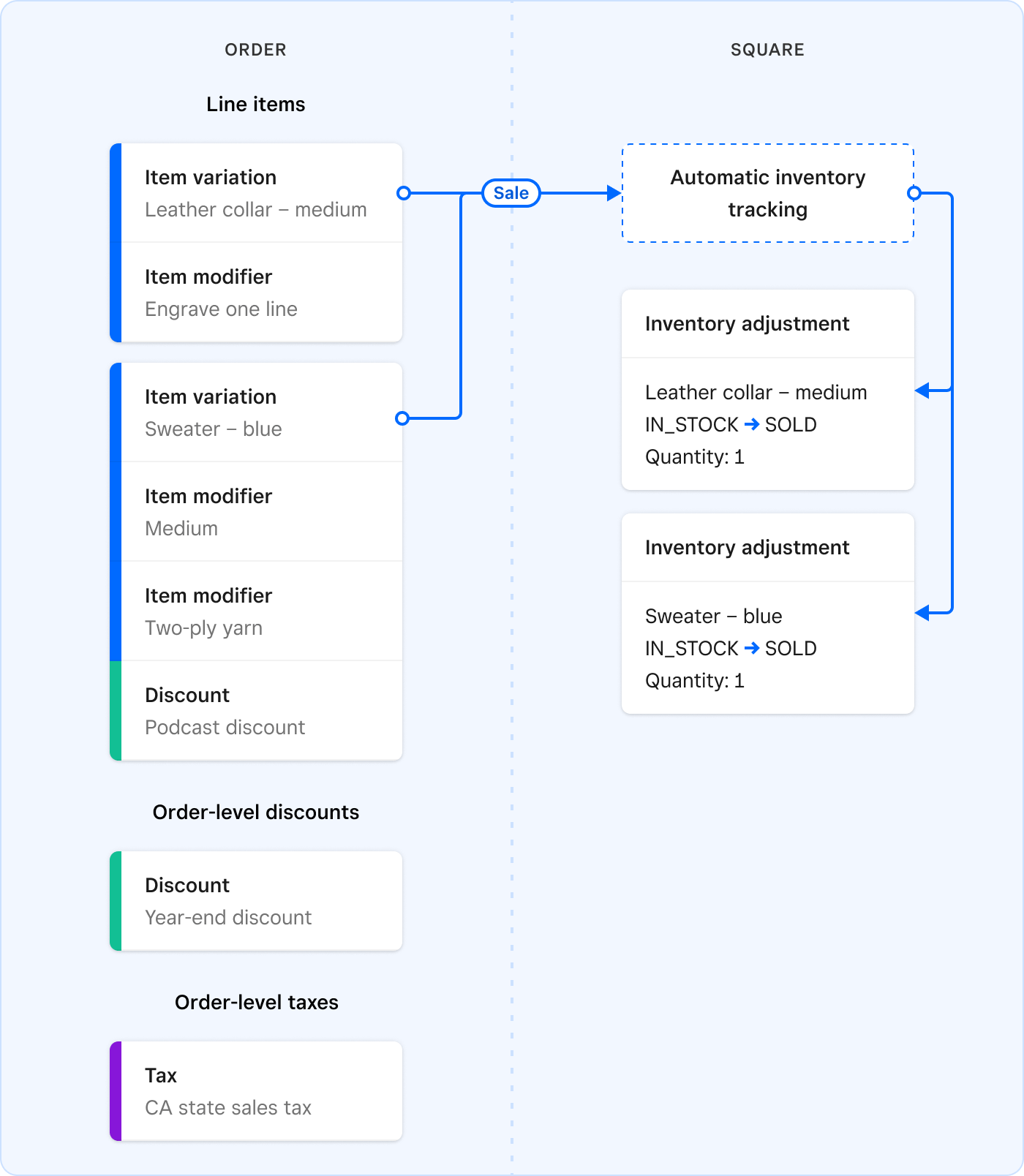
In addition to updating inventory on hand when an item is sold or returned, Square supports receiving stock, marking waste, and reconciliation.
With inventory, a seller can answer questions like "How much do I have in stock at my main location now?" and "How many of a particular item were lost?" Historical data can also show trends, such as how fast a product sells or when it should be restocked.
For items or services to be tracked in an inventory, they must be defined as item variations in the Square catalog. In the Square Dashboard, managing the catalog and maintaining the inventory are integrated in the item library.
The Inventory API allows you to manage inventories programmatically for Square sellers. You can adjust inventory quantities and review all adjustments for any sellable object in item library. To track new items, enable your application to call the Catalog API to create items with required variations.
Applications can also record why a quantity changed using adjustment reasons (including seller-defined custom reasons), track what the seller paid by recording costs and vendors on stock-receiving adjustments, and represent movement between locations as cross-location adjustments.
- Inventory quantities can only be tracked on items of the CatalogItemVariation type. For more information about working with the Square item library, see Catalog API.
- The Inventory API doesn't support the tracking of subcomponents, ingredients, or product bundling.
- The OAuth
INVENTORY_READpermission is needed to read inventory information. - The OAuth
INVENTORY_WRITEpermission is needed to modify inventory quantities.
The Inventory API provides objects to represent inventory adjustments and physical counts for item variations and transitions to relevant inventory states. Key data types include:
- InventoryCount - Defines the calculated quantity of an item variation at a specific location with a specific inventory state. Square recalculates the quantity on an adjustment or physical count.
- InventoryAdjustment - Describes the quantity of an item variation transitioning from one inventory state to another.
- InventoryPhysicalCount - Defines the verified quantity of an item variation at a location with a specific state as determined by a manual count or trusted system.
- InventoryTransfer - Defines the quantity of an item variation transferred from one location to another. A transfer can only be initiated in a Square product such as the Square Dashboard. The Inventory API can only read inventory transfer information.
- SourceApplication - Describes the application that makes an inventory change and helps trace sources of inventory changes.
InventoryCount and InventoryPhysicalCount objects are similar in that they both describe the current quantity of a CatalogItemVariation, but InventoryPhysicalCount is a provided value and InventoryCount is a computed value.
InventoryPhysicalCount represents the actual quantity of an item variation physically present, such as from an employee count or syncing with an external system. InventoryCount represents the quantity Square estimates based on inventory adjustments since the last physical count. Ideally, both values match, but discrepancies can occur due to item loss, damage, or human error.
In this example, a seller receives stock, sells some, wastes some, and then does a physical recount. The physical recount shows a different quantity on hand than Square's calculated amount so the actual physical count overrides the calculation.
Consider the case where a seller receives a quantity of dog collars into inventory. Initially, there are no collars in stock. In the morning, the seller receives 100 small leather collars and adds them to inventory, changing their status from NONE to IN_STOCK. During the day:
- Three collars are sold in-store, moving three units from IN_STOCK to SOLD.
- An online customer buys one collar, moving one unit from IN_STOCK to SOLD.
- Two collars are accidentally damaged, so the seller moves two units from IN_STOCK to WASTE.
At this point, the calculated inventory count for small leather collars in the IN_STOCK state is 100 − 3 − 1 − 2 = 94 units.
At the end of the day, the seller counts all the small leather collars in the store and finds that there are only 93 collars available for sale. To reconcile the computed and verified counts, the seller pushes the physical count to Square, which triggers a dog collar inventory count calculation and updates the IN_STOCK quantity of small leather collars to 93.
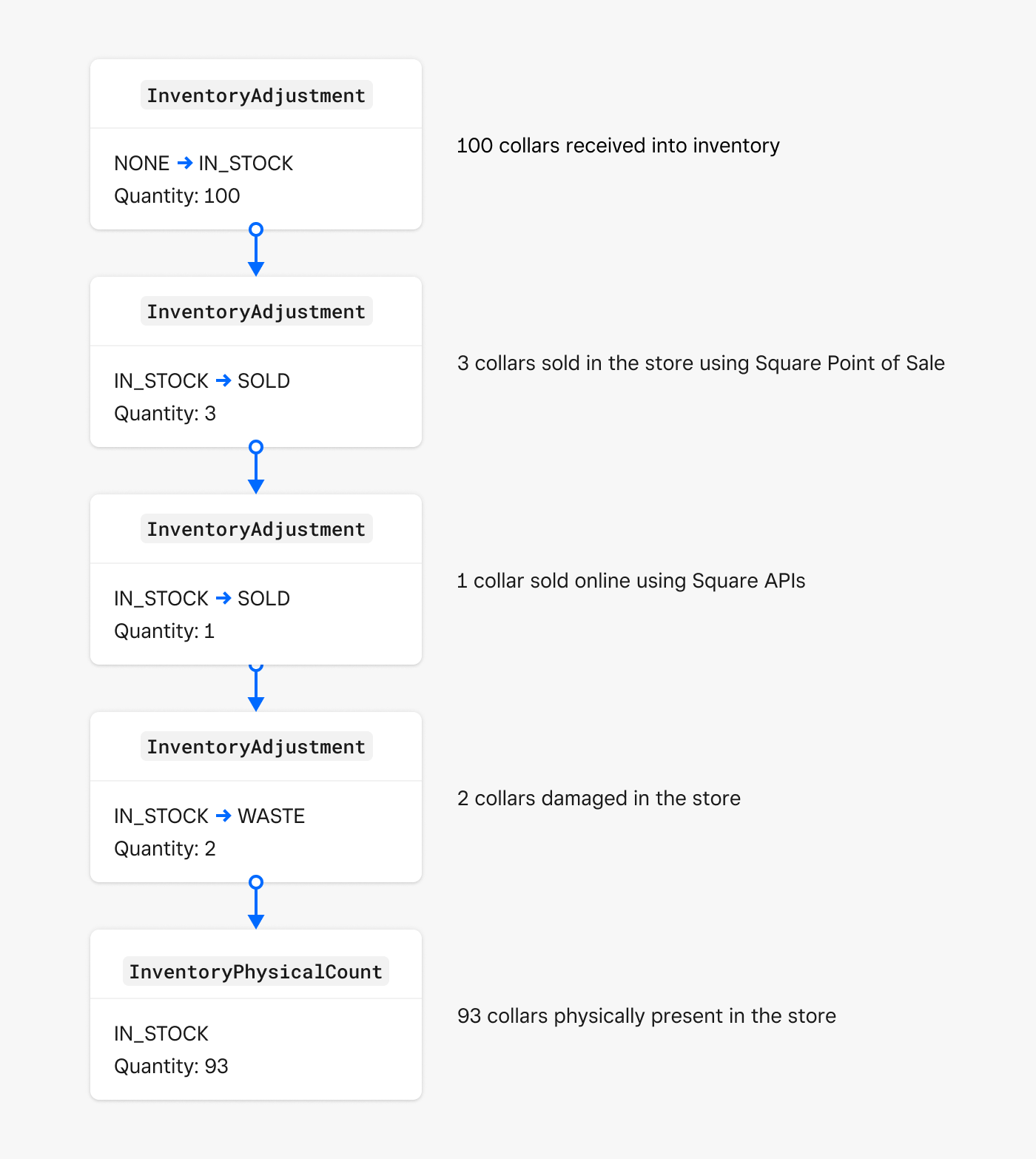
The main point to understand is that inventory adjustments are handled by moving quantities of item variations at a given location from one state to another rather than assigning and decrementing a single quantity.