Learn about the different types of access tokens and other credentials used to identify, authenticate, and authorize an application for Square development.
## Overview
Access tokens are credentials that allow applications to securely interact with Square APIs. An access token authenticates your application and authorizes access to resources in a Square account, such as customers, orders, and payments. Proper credential management and storage is critical for maintaining security.
## Access token types
You must provide a valid access token when calling Square APIs to access resources in your own Square account or other Square accounts.
There are two types of access token:
* **Personal access token** - Provides unrestricted Square API access to resources in a Square account. You can use your personal access token in Square API calls to perform any activity on any resource in your own Square account.
* **OAuth access token** - Provides authenticated and scoped Square API access to resources in a Square account. Applications use OAuth access tokens in Square API calls to access resources on behalf of account owners. When Square sellers sign up to use an application, they grant the specific permissions (scopes) that the application needs to perform some activity on their account resources.
In production environments, multi-tenant applications that serve multiple sellers should use OAuth access tokens. For custom integrations that only access your own Square account, personal access tokens are suitable for production use.
You must protect access tokens and store them securely.
Calls to the [Webhook Subscriptions API](/docs/webhooks/webhook-subscriptions-api) and [Events API](/docs/events-api/overview) require the application's personal access token because these APIs manage application-level events.
## Get a personal access token
Each application you create in the Developer Console provides a personal access token for use in the production environment and a separate Sandbox access token for use in the [Square Sandbox](/docs/devtools/sandbox/overview). These access tokens grant full access to the resources in a Square account and are generally used for testing.
1. Sign in to the [Developer Console](https://developer.squareup.com/apps) and open the application that's calling the Square APIs. If needed, follow the steps in [Get Started](/docs/get-started) to create a Square account and an application.
2. In the left pane, choose **Credentials**.
Get your production or Sandbox access token:
1. At the top of the page, choose **Production**.
2. In the **Production Access token** box, choose **Show** and copy your token.
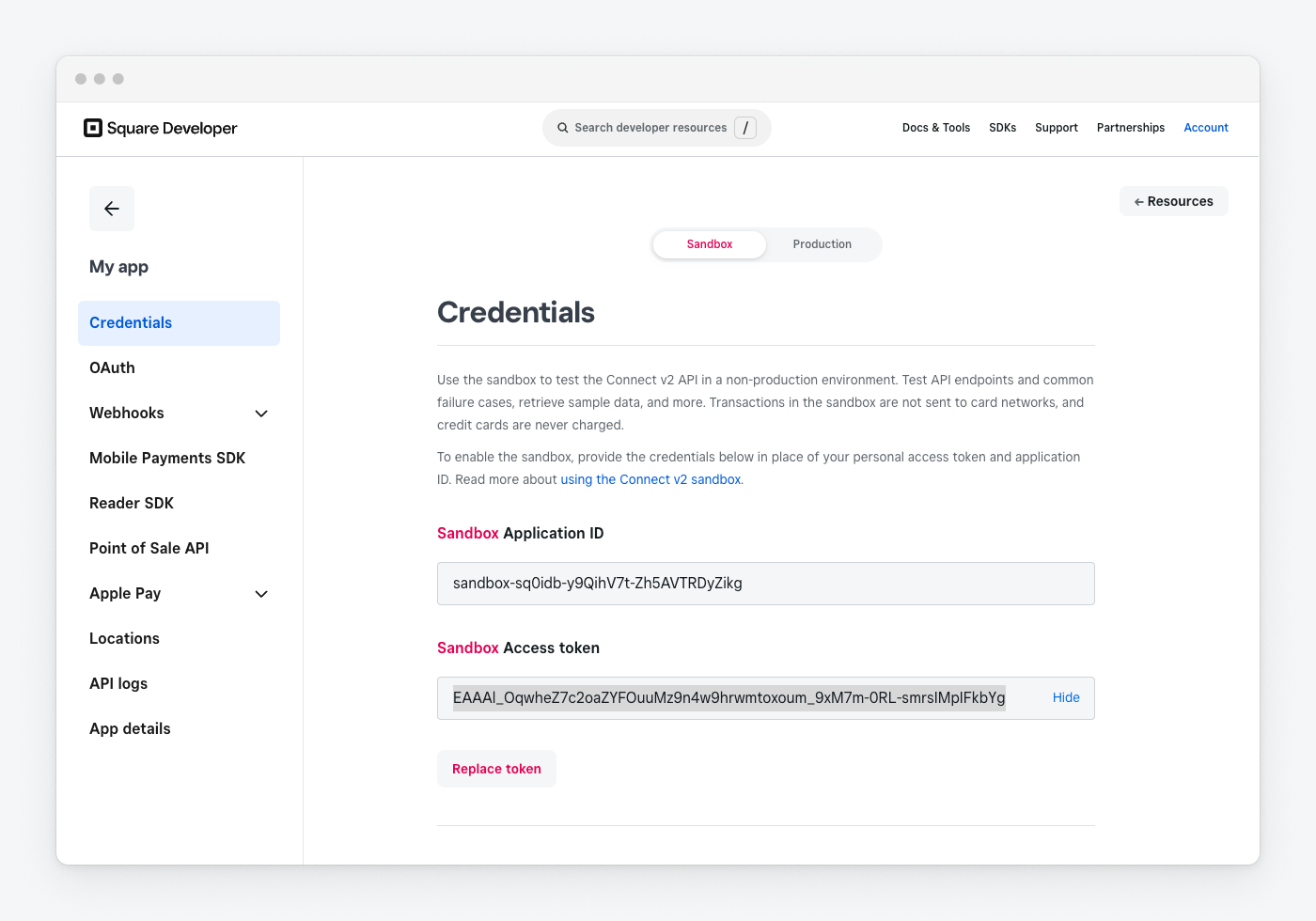
1. At the top of the page, choose **Sandbox**.
2. In the **Sandbox Access token** box, choose **Show** and copy your token.
Your Sandbox access tokens are also available from the **Default Test Account** user on the **Sandbox test accounts** page in the Developer Console and when you're signed in to API Explorer.
The following screenshot shows the Sandbox access token on the **Credentials** page.
When you're signed in to [API Explorer](https://developer.squareup.com/explorer/square), the access tokens associated with your account are available in the **Access token** dropdown.
The following guidelines apply to protecting personal access tokens:
* **Don't hardcode access tokens in your code** - Consult relevant documentation to find best practices for securely storing credentials, including framework-specific considerations (for example, encrypted credentials for Ruby on Rail) and platform-specific considerations (web or mobile applications). One option might be to use your cloud provider's secrets manager, such as AWS Secrets Manager, Google Cloud Secret Manager, or Azure Key Vault.
* **Don't share access tokens** - A personal access token can be used to impersonate the account owner and gain full access to account resources. For example, if you paste a cURL code snippet when debugging an issue with Square support or on community forums, make sure to redact the access token used in the `Authorization` header.
## Get an OAuth access token
The process of getting an OAuth access token depends on the application type (which determines whether you use the code flow or PKCE flow) and whether the token is used in production or for testing in the Square Sandbox during development.
In-production applications start the OAuth flow by sending each seller to the Square authorization page. On successful flow completion, Square returns an OAuth access token to your application.
The OAuth flow includes the following high-level stages:
| Stage 1: Authorization | Stage 2: Callback | Stage 3: Token request |
|------------------------|-------------------|------------------------|
| Your application uses an authorization URL to send the seller to the Square authorization page where they can sign in to Square and grant the permissions you requested. | Square uses your redirect URL to send the seller back to your application and appends a `code` query parameter that contains an authorization code. | Your application calls `ObtainToken` and sends the authorization code, your application ID, and other fields. Square returns an access token and refresh token. |
Testing in the Sandbox lets you verify that your application can successfully access and manage resources in a Square account and gracefully handle authorization errors. You have two options for getting access tokens:
* **Simulate the OAuth flow** - You can simulate the OAuth flow in the Sandbox. For more information, see [OAuth Walkthrough: Test Authorization with a Web Server](/docs/oauth-api/walkthrough). Note that signing in to the Square authorization page directly using a test Sandbox account isn't supported.
* **Generate OAuth access tokens** - If you're not ready to add an OAuth flow, you can quickly generate Sandbox OAuth access tokens to try calling Square APIs with a specific set of permissions.
To generate a Sandbox OAuth access token:
1. [Create a Sandbox test account](/docs/testing/create-and-authorize-sandbox-account#create-a-sandbox-test-account) in the Developer Console.
2. [Authorize the Sandbox test account](/docs/testing/create-and-authorize-sandbox-account#authorize-a-sandbox-test-account) with the set of permissions you want to test.
You can get your Sandbox access tokens later from the Developer Console on the **OAuth** page for your application or from the **Sandbox test accounts** page. They're also available when you're signed in to [API Explorer](https://developer.squareup.com/explorer/square).
**Protect access tokens and store them securely** - Store OAuth access tokens and refresh tokens in a secure storage solution. Don't expose them in client-side code or version control systems. You must refresh OAuth access tokens periodically before they expire. For more information, see [OAuth API](/docs/oauth-api/overview) and [OAuth Best Practices](/docs/oauth-api/best-practices).
## Use an access token in your code
Access tokens are sent as bearer tokens in the `Authorization` header of Square API requests.
* Production requests use the `https://connect.squareup.com/v2` base URL with an access token that's valid for the production environment, as shown in the following cURL request:
```curl
curl https://connect.squareup.com/v2/locations \
-H 'Square-Version: 2024-07-17' \
-H 'Authorization: Bearer {PRODUCTION_ACCESS_TOKEN}' \
-H 'Content-Type: application/json'
```
* Sandbox requests use the `https://connect.squareupsandbox.com/v2` base URL with an access token that's valid for the Sandbox environment, as shown in the following cURL request:
```curl
curl https://connect.squareupsandbox.com/v2/locations \
-H 'Square-Version: 2024-07-17' \
-H 'Authorization: Bearer {SANDBOX_ACCESS_TOKEN}' \
-H 'Content-Type: application/json'
```
Using the wrong access token for the production or Sandbox environment results in an `AUTHENTICATION_ERROR` error with the `UNAUTHORIZED` error code.
### Using access tokens with Square SDKs
When using a backend Square SDK, the client is initialized with an access token and target environment. The following PHP SDK snippet initializes the client for the Sandbox:
```php
$client = new SquareClient(
token: $_ENV['SQUARE_ACCESS_TOKEN'],
options: [
'baseUrl' => Environments::Sandbox->value
]
);
```
```php
$client = SquareClientBuilder::init()
->bearerAuthCredentials(
BearerAuthCredentialsBuilder::init(
$_ENV['SANDBOX_ACCESS_TOKEN']
)
)
->environment(Environment::SANDBOX)
->build();
```
For more information, see the quickstart guide:
* [Go SDK](/docs/sdks/go/quick-start)
* [Java SDK](/docs/sdks/java/quick-start)
* [.NET SDK](/docs/sdks/dotnet/quick-start)
* [Node.js SDK](/docs/sdks/nodejs/quick-start)
* [PHP SDK](/docs/sdks/php/quick-start)
* [Python SDK](/docs/sdks/python/quick-start)
* [Ruby SDK](/docs/sdks/ruby/quick-start)
## Credential types
The following table lists the access tokens and other credentials used for Square development. Credential use is dependent on your development scenario.
| Credential | Type | Description | Use | Obtained from |
|------------|------|-------------|-----|---------------|
| Application ID | Identification | Random, unique ID assigned by Square | Identifies your application in select Square API and SDK calls against the production environment. Also called a client ID. | Developer Console **Credentials** application page |
| OAuth access token | Authorization | Scoped access token | Grants seller-scoped and limited access to production resources in a Square account by asking an authenticated user for explicit permissions. | Programmatically using the [OAuth API](/docs/oauth-api/overview) |
| OAuth refresh token | Authorization | Special-purpose token | Used to obtain a new access token before the current one expires. | Programmatically using the [OAuth API](/docs/oauth-api/overview) |
| Application secret | Authentication | OAuth authentication credential | Verifies the identity of your application in OAuth API requests to get or refresh an OAuth access token. Also called a client secret. | Developer Console **OAuth** application page |
| Personal access token | Authorization | Full-access (unscoped) access token | Grants unrestricted access to production resources in the corresponding Square account. Also called a production access token. | Developer Console **Credentials** application page |
| Repository password | Authorization | Random, unique ID assigned by Square | Grants your development environment access to the remote repositories that serve Reader SDK binaries | Developer Console **Reader SDK** application page |
| Sandbox application ID | Identification | Random, unique ID assigned by Square | Identifies your application in select Square API and SDK calls against the Sandbox environment. Also called a Sandbox client ID. | Developer Console **Credentials** application page |
| Sandbox access token | Authorization | Full-access (unscoped) access token | Grants unrestricted access to Sandbox resources in the corresponding Square account. | Developer Console **Credentials** application page |
| Sandbox OAuth access token | Authorization | Scoped access token for a Sandbox account | Grants scoped access to resources for a Sandbox application/account pair based on a specified set of permissions. | Developer Console **OAuth** application page or **Sandbox test accounts** page |
| Sandbox OAuth refresh token | Authorization | Special-purpose token | Used to obtain a new access token before the current one expires. | Developer Console **OAuth** application page |
| Location ID | N/A | Random, unique ID assigned by Square | Not a type of credential, but required for many Square API requests. | Developer Console **Locations** application page or programmatically using the [Locations API](https://developer.squareup.com/reference/square/locations-api) or [Merchants API](https://developer.squareup.com/reference/square/merchants-api) |
## See also
* [Developer Console](/docs/devtools/developer-dashboard)
* [Square Sandbox](/docs/devtools/sandbox/overview)
* [OAuth API](/docs/oauth-api/overview)
* [Move OAuth from the Sandbox to Production](/docs/oauth-api/movetoprod)
* [Refresh, Revoke, and Limit the Scope of OAuth Tokens](/docs/oauth-api/refresh-revoke-limit-scope)